Game Vault on BitPlay — 999 vs 777, Fish Games, Login & Access Guide
Game Vault is a fish table and slots gaming platform available in two versions: Game Vault 999 and Game Vault 777. The difference between them is the most common question users have before committing to an account. This guide covers what each version includes, how to access and play online, login steps, device options, and how to verify you are on a safe portal.

What Is Game Vault?
Game Vault is a gaming platform that hosts fish table games, slot-style titles, and other arcade formats using a virtual coin system. It is not a traditional licensed online casino; the model uses virtual coins rather than direct wagering, allowing participation in US states where traditional online casino gaming is restricted. BitPlay is managing account setup, deposit processing, and credential delivery for both versions.
Game Vault casino is available via the social gaming model, which may allow participation in states where traditional online gaming is restricted. Availability varies by location, and regulations may change. Confirm whether participation is permitted in your location before creating an account. This content is not legal advice.
Game Vault 999 vs 777 — What's the Difference?
Game Vault 999 overview
Game Vault 999 is one of two main versions of the platform, named after the 999 portal used for its login and access. The 999 version runs on a virtual coin system consistent with other BitPlay platforms. Players deposit through BitPlay, receive their credentials and a platform link by email, and access the Game Vault 999 lobby through that link. The 999 game library includes slots, fish table games, and other arcade formats, though specific title availability may vary by build.
Game Vault 777 overview
Game Vault 777 is the second main version and shares its name with its associated portal designation. The 777 version uses the same access flow.

Game Types and Library
Fish table games
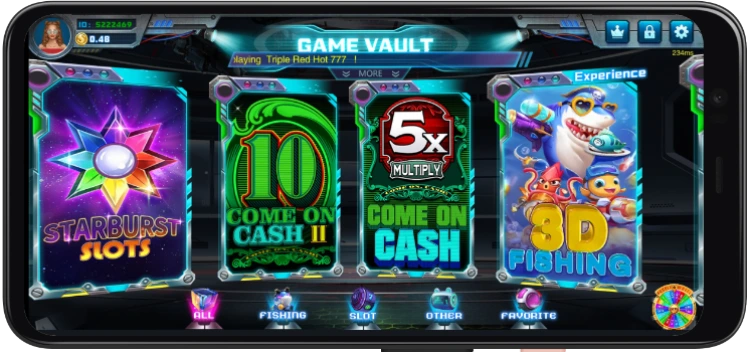
The Game Vault casino fish table library includes 9 confirmed titles that use the targeting-based arcade format, in which players select a coin-per-shot value and aim at moving underwater targets. Popular fish titles include King Crab III and Monkey Madness.
Slot games
Game Vault's online slot titles number 23, confirming slots as the largest category in the library. Popular slot titles include Cash Machine, Life of Luxury II, and Superball Keno.
Other game modes
Five additional game titles fall outside the fish table and slot categories. This group includes Superball Keno. These formats complete a library of 37 confirmed titles across both versions of the platform. Learn more at Keno Rules for Beginners and Keno Pay Tables Explained guides.

How to Play Game Vault
Play online — web version
Playing Game Vault online via BitPlay follows this sequence: log in to your BitPlay account, go to the deposit section, select the platform, and place an order using your sign-up free play credits. We'll email your credentials and platform link. Open the link and log in to access the Game Vault casino lobby in your browser. The GameVault web version requires no separate download on desktop or mobile.
Download — Android
An Android APK may be available for Game Vault through BitPlay for users who prefer a home-screen shortcut. Only source the APK through BitPlay third-party APK repositories, which are unverified and may route to unofficial portals. Enable 'Install unknown apps' in your Android device settings before opening the APK file provided by BitPlay.
iPhone and iOS access
The App Store does not distribute gaming apps, so iOS users access Game Vault through the browser-based web version. Open the platform link from your credential email in Safari or Chrome on your iPhone. The game lobby loads in the browser with no installation required. Browser play on iPhone uses the same credentials as on Android and desktop.
PC and desktop
Desktop users access Game Vault online by opening the platform link from their credential email in Chrome, Firefox, or Edge on Windows or macOS. No emulator or additional software is required for browser-based desktop play.

Game Vault Login
Where to find your credentials
Your Game Vault login credentials, username, and password are delivered to your email. Open the platform link in the relevant credential email, enter your details, and log in to the game lobby.
Forgot your password
To reset your Game Vault account password, contact BitPlay support using your registered email address, or click the password recovery link on the login page.
Login troubleshooting
Before escalating a login failure to support, confirm:
- You are opening the exact platform link from your BitPlay credential email for the correct version (999 or 777)
- Credentials are entered exactly as provided, both are case-sensitive
- No active session is running on another device with the same credentials
- Third-party cookies are enabled for the platform domain
- VPN is disabled

Is Game Vault Safe and Legit?
Verification checklist
Game Vault access through BitPlay is the verified path for US players. Your credentials and platform link are delivered through the BitPlay deposit flow, not through any standalone Game Vault registration portal. Before entering credentials on any Game Vault page, apply this checklist:
- Link matches the one in your BitPlay credential email, check character by character
- HTTPS is visible in the browser address bar
- Page was reached by opening the email link, not through a search engine result
- No payment details are requested before the login step
- Support contact routes to a verifiable BitPlay channel
Red flags to avoid
Unofficial Game Vault portals sometimes surface in search results using branding similar to the legitimate platform. Common red flags include: payment requests before login, unsolicited APK download links from non-BitPlay sources, and login pages reached through social media posts or SMS rather than your credential email.
Responsible play
Game Vault on BitPlay is designed for entertainment purposes only. All play uses virtual coins, set a coin budget, and session time limit before each session, and stop when either is reached. Outcomes across all game formats are not guaranteed and vary from spin to spin or shot to shot.